

The iPhone revolutionized photography. With each iteration of the device, there was less and less need to use dedicated camera hardware. Now, most people don’t bother – and chances are you grab your phone when you want to capture a moment.
But are you getting the most from your iPhone’s built-in camera app? And which alternatives should you consider if Apple’s app isn’t enough for you? This round-up will help you decide.
Camera (free)
Best for getting started

Apple’s Camera app makes it easy to switch shooting modes and (on supported hardware) access Night mode when it’s dark, along with 48MP RAW capabilities. Exposure can be manually adjusted by tapping a point on the screen and dragging up and down.
There are hidden controls too. Tap-hold the zoom button to display a dial to fine-tune your zoom level – although be mindful digital zooming reduces image quality. Or drag upward to access aspect ratios, timers, and fine-grained exposure settings. On iPhone 16 and above (excepting ‘e’ models), latest-gen photographic styles also let you experiment with live filters that can later be adjusted or removed.
For pros, the lack of manual focus and zebra stripe aids might be a deal breaker. But as a starting point for shooting images on iPhone – or a point-and-click with solid defaults – Apple’s Camera is your best bet.
Obscura 4 (free or $25/£25 per year or $65/£60 lifetime)
Best for tactile controls
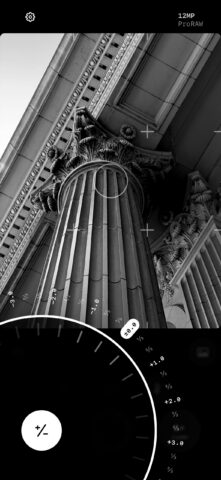
Obscura has long played with concepts of tactility, alluding to the dials and controls on real-world cameras. Recent updates abstracted that idea to some degree, but the app retains its playful, usable feel.
The mode button lets you quickly switch between preconfigured context-sensitive set-ups. Photo is ideal for quick snaps, Pro adds manual controls, and there are options for Live Photos, portraits and video, each with distinct layouts. When in Pro, you can tap-hold and drag to fine-tune exposure and focus via dials – a gesture that feels natural and precise. The Obscura 4 redesign ensures controls are always within easy reach.
Elsewhere, the app includes RAW capture, filters, and library tools for digging into photo metadata. But the main reason you’ll keep returning to this app is that while it’s pro-oriented, it’s also really fun to use.
Halide Mark II ($20/£20 per year or $60/£60 lifetime)
Best for thoughtful photography
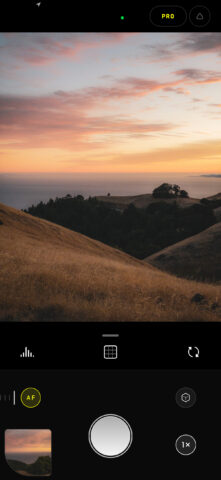
Halide bills itself as the most powerful camera app for iPhone. Yet it’s approachable, with the default set-up primarily being a shutter, a lens switch button, and a manual focus strip.
Dig deeper and you unearth photography aids, including a focus loupe, focus peeking and exposure warning stripes. You can add an on-screen histograph, adjust white balance, trigger a timer, and change which buttons appear in the main toolbar. Lock Screen widgets let you jump right into a mode or lens on launch. A bespoke iPad mode is ideal for people who shoot snaps using Apple’s tablet.
Halide also lets you bypass Apple’s fancy image capture pipeline entirely, to shoot photos that feel more natural and less processed. Suffice to say if you have an interest in measured, thoughtful, pro-oriented iPhone – or iPad – photography, this app’s a must.
At the time of writing, Halide Mark III was in beta, offering a range of new features, such as film simulation, adjustable aspect ratios, tone editing, and more. These will soon come to anyone subscribing to the existing app.
ProCam 8 ($10/£10 + optional IAP)
Best value pro camera

ProCam gives you plenty of control over iPhone photography. Surrounding the viewfinder are plentiful buttons, providing immediate access to a wealth of features, including format, exposure, focus, shutter speed, and white balance.
Menus provide access to many more options (guides; focus assists; tilt meter; timer behaviors), enabling you to make your personal set-up just so. And the app’s many shooting modes – including time lapse, video, burst, and 3D – make it a great option if your shooting needs are varied.
In use, the app lacks the refinement of Obscura and Halide, with an interface that can feel cluttered. But it’s also efficient. Fast access to so many features coupled with the lowish one-off price tag (a rarity these days) makes it a good buy.
ProCamera ($30 per year or $100/£20 + optional IAP)
Best for perspective correction
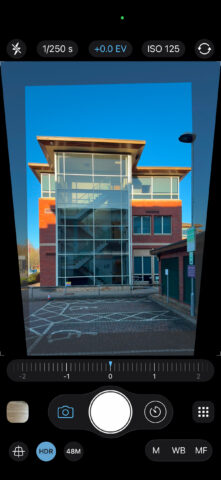
ProCamera’s default interface belies its pro features, looking disarmingly simple. On launch, you initially get fast access to lenses and a large dial for adjusting white balance. But when you dive into the main menu and switch to manual, you’ll gain fingertip access to a much wider range of controls. The result is an app that deftly balances power, control and usability.
Most pro features used to come with an initial one-off purchase, but in the USA the app has shifted to a subscription. The same will likely happen elsewhere eventually. That means, depending on where you’re located, you’ll either have to subscribe or shell out a hefty one-off payment for permanent access to the likes of custom presets and auto perspective correction. The latter is a standout, especially for architectural photography.
Regardless of how you pay, the app as a whole is an investment – but a worthwhile one for serious iPhone photographers. It’d just be nice if the global business model was simpler.
Classic Camera by Hipstamatic ($5/£5 + IAP)
Best for analog vibes
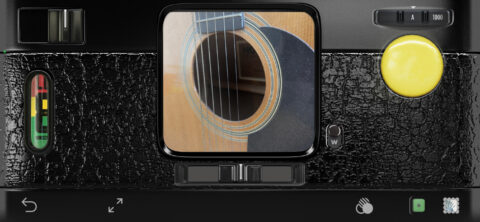
If you’ve only ever known shooting photos on phones, you’ll be enamored by the relentless march of technology. But if you once loved film, you might miss its grime and randomness. Hipstamatic Classic brings all that back.
With your iPhone in landscape, you get an old-school camera – and can swap out lenses, flashes and films that add distinct character to shots. (You get a small selection of virtual kit with the app. More is available via IAP.) For fans of point-and-shoot, it’s a joy.
If you desire control, you get that too. You can save clean images alongside rendered shots, and the pro camera mode adds manual focus, exposure and shutter speed. For fans of old and new, this app’s the best of both worlds.
Get Classic Camera by Hipstamatic
There is another Hipstamatic app, which is more recent. It’s free to try, but with a $30/£30 subscription for unlocking its many lenses, effects, and tools. Its integration of lenses like fisheye and pinhole plays up the retro/toy nature of the camera, and it also bolts on an “anti-Instagram” social network. But it can feel a bit sluggish in use and lacks the charm of the original.
Also consider…

Dazz Camm (free + IAP or $20/£20): More analog film mimicry with a smattering of toy camera fun. Some nice lenses and effects here that are worth exploring, especially if Hipstamatic doesn’t click with you.
Hydra 2 (free + $10/£9 per year): This camera app bangs the AI drum, using its smarts to go beyond your iPhone’s sensors. That means higher-resolution shots and more powerful zooms – and the results can wow.
Lemon Squeezy (free or $7/£7 per year or $13/£13 lifetime): Created by our editor and designed for kids, this friendly, usable, ad-free camera is ideal for getting little ones into photography.
Lightroom (free): This Adobe app is primarily an editor but bundles a camera with manual controls. It feels basic, stark and unfriendly but the results are solid and it’s free to use.
Project Indigo (free): Another entry from Adobe. This one’s experimental, using AI to improve night shots and increase the resolution of zoomed photos. Results are variable, but it’s free and the highly usable manual mode is impressive.
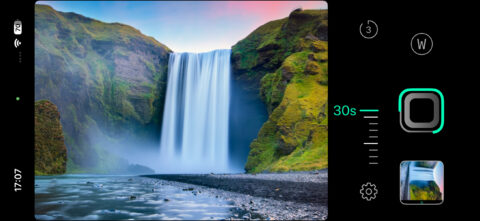
ReeHeld ($8/£7 per year or $25/£25 lifetime): The idea behind this app is letting you shoot long exposures without needing a tripod. The results are impressive. Unconvinced? You get ten free shots to try it out before buying.
Retrica (free or $60/£60 per year): This app makes it a cinch to work with live filters and bolts on a multi-shot (labeled “collage”) for good measure. It’s just a pity the pro tier, with its great features and presets saving, keeps getting price hikes.
Slow Shutter Cam ($3/£3): Other camera apps offer time-lapse, but this one focuses entirely on the task. Its mix of quality features combined with a generous low-price make it a great buy – if you’re armed with a tripod.
SoSo Camera Beauty ($1/£1 + $1/£1 ad-free): An excellent multishot camera, with a range of filters, a fully configurable grid, custom duration settings between shots, and a wallet-friendly low price. Highly recommended and lots of fun.