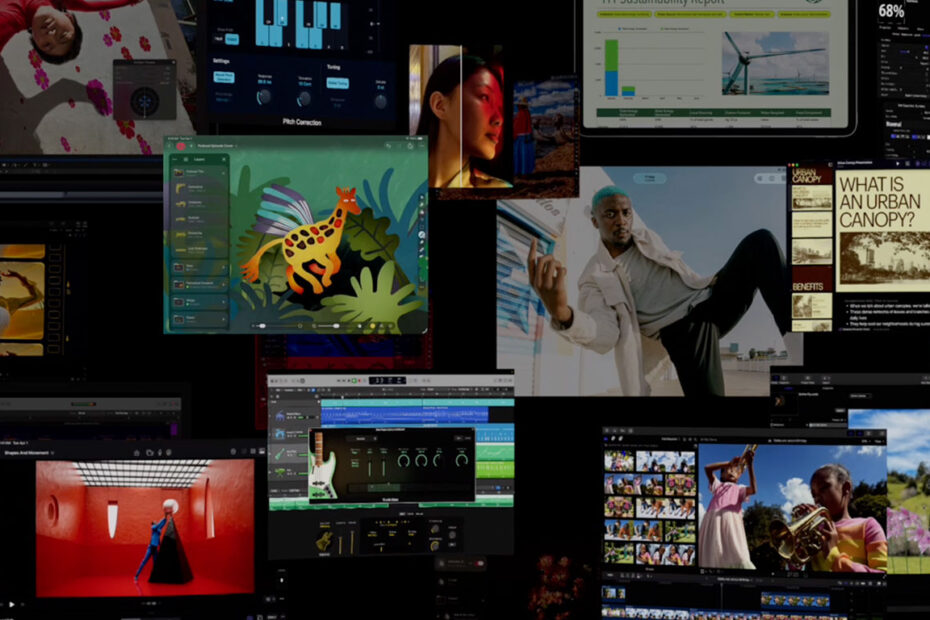

In January, Apple unveiled Apple Creator Studio, billed as an “inspiring collection of the most powerful creative apps,” and bundled with “new AI features and premium content” under a single subscription.
But should you care? What does this actually mean for iPhone and iPad users? And what are your options if you don’t want to buy into Apple’s bundle? Let’s dig in.

The Apple Creator Studio lineup, minus – for some reason – Compressor.
The value proposition
Apple Creator Studio includes ten apps. The big draws on Mac and iPad are Final Cut Pro (video editing), Logic Pro (music production), and Pixelmator Pro (image editing). On Mac, you also get Motion (motion graphics), Compressor (video export), and MainStage (live performance). Rounding things out are enhanced versions of office apps Keynote, Pages, Numbers, and Freeform.
Pricing is $13/£13 per month or $129/£129 per year, dropping to $3/£3 per month or $30/£30 per year for verified university students and educators. Family Sharing covers up to six people on the standard plan, but the education one is single-user only. There’s also a one-month free trial – or three months with a new device purchase.
On Mac, Final Cut Pro ($300/£300) and Logic Pro ($200/£200) have only been pay-once apps until now. However, the iPad equivalents were always subscription-only. They cost $5/£5 per month or $49/£49 per year each, and there was no bundle discount. So in both cases, Apple Creator Studio marks a shift.
My take is that the education pricing is undeniably a bargain and $13/£13 isn’t bad if you need a power app for a short project. Long-term value, though, hinges on whether you’ll use multiple apps and also work across Mac and iPad. That’s where things start to wobble.
Second-class citizens
On Mac, Apple has sensibly retained standalone pay-once versions of Final Cut Pro and Logic Pro. On iPad, though, Apple has removed single-app subscriptions. That means new users who want Logic Pro, Final Cut Pro, or Pixelmator Pro on iPad must subscribe to Apple Creator Studio. That’s fine for creative generalists but absurd for specialists, who are now forced to pay more for a bundle of apps, most of which they’ll never touch.

Want Pixelmator Pro for iPad? It’s only in Apple Creator Studio.
It also reinforces the idea iPad is a secondary platform, on which you dabble rather than build a serious, focused creative workflow around. Apple spent years arguing the opposite, but this move undermines that effort. It’s not surprising, though, given Apple’s relentless push to grow services revenue.
(As for iPhone users, I haven’t forgotten about them – but Apple may have. None of its “pro” creative apps are available for iPhone at all…)
Identity crisis
The name “Apple Creator Studio” suggests a focused creative bundle. So the presence of four previously entirely free office apps muddies the proposition. Apple’s main justification for including them appears to be Content Hub, which gives subscribers access to curated images and illustrations. I’d say combining office tools with stock art hardly screams “creativity.” And even if you argue Apple is widening the definition of creative work, it still feels like Adobe and Microsoft merging and insisting Photoshop and Excel belong in the same bundle.
Apple also claims value is added through AI features, again reserved for subscribers. But there are problems here too. The free versions of its office apps have become advertising billboards, nudging you to pay. And the AI tools themselves are expensive to run, which is why Apple has imposed usage limits that can hit fast. Developer Steve Troughton-Smith burned through 42% of the monthly usage limit with just 20 Keynote slides, some images, and a word cloud. His verdict: “Slop is expensive, huh?” (Apple’s own support document doesn’t dispute his findings.)
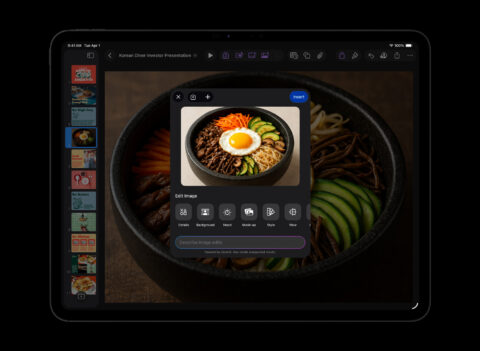
AI in keynote. You can quickly run into usage limits.
Worse, it’s not just AI and Content Hub that Apple has put behind a paywall. While the standalone versions of Logic Pro and Final Cut Pro appear to largely match their subscription counterparts, Pixelmator Pro lags behind, missing the revamped interface and tools like Warp. Whether this is a blip or a sign of things to come, Apple isn’t saying.
The alternatives
Perhaps none of the drawbacks matter to you. But if they do, there are other apps to try. For music, Apple’s own GarageBand (free) is effectively a capable Logic Lite. For something more pro, Cubasis 3 ($50/£50) and Korg Gadget 3 ($40/£40) exist for iPad and iPhone – unlike Logic.
For video, LumaFusion ($30/£30) is excellent on iPad and iPhone, while DaVinci Resolve for iPad (free or $95/£95) is surprisingly full-featured in its free incarnation. (Pay the one-off fee and you gain access to advanced processing features and effects.)
For image editing, Adobe Photoshop (free app + subscription) is now on iPad and iPhone, and Pixelmator Classic ($10/£10) is still around, even if Apple has said it will no longer be updated. On iPad, Affinity Photo 2 (free) no longer has a price tag and will soon align with its upgraded desktop counterpart.

Affinity Photo 2 for iPad is now entirely free.
One bundle to rule them all?
I should be the ideal customer for this bundle, not least because I pay Apple Creator Studio money for Photoshop alone. Yet I’m not yet convinced. I don’t love renting software, and I already own Logic Pro on Mac. But also, the way Apple packaged this collection feels forced, while the creeping freemium model and gating feel grubby.
Still, it could be worse. Perhaps we should all be grateful that Apple didn’t just lob all of these apps – and everything else it sells – into a single mega-subscription reboot of Apple One, costing “just” $999 a month. Although, you know, give it time.