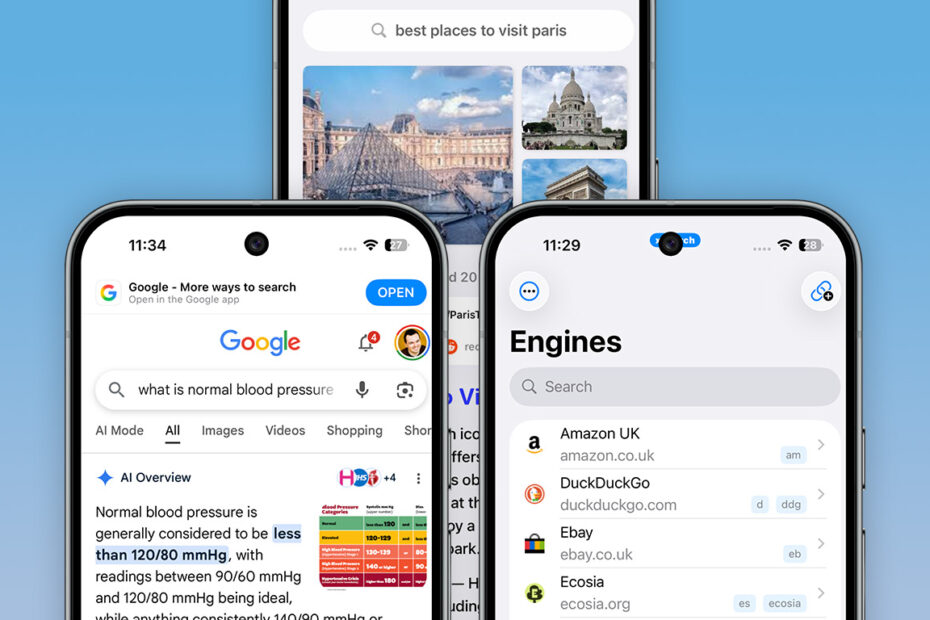

Google has always been the default search engine on the iPhone. Chances are, you use it yourself. But change is coming. Regulators in the EU and Japan are forcing Apple to show “search engine choice” prompts, making alternatives more visible instead of hiding them deep in Settings. Google and Apple are pushing back – both profit handsomely from their deal – but awareness of choice is now only likely to spread.
You don’t need to wait. Here’s why you should consider ditching Google as your default today, how best to access other search engines, and when it’s still fine to use Google.
Why you should move on from Google Search
Google Search rose to dominance because it was simple and effective. Unlike bloated, cluttered rivals, it cut through the noise. Today, it’s a different story. Ads pepper results pages, often above what you actually want. Google’s privacy and tracking record is questionable. And a constantly shifting algorithm forces content creators to chase Google rather than focus on their audience.

Always double-check AI-generated search results. They’re often wrong.
Having long stifled competition through sheer dominance, Google is now laying the groundwork to keep users inside its ecosystem rather than sending them to the wider web. Results pages increasingly feature (often inaccurate) AI-generated overviews, training people to expect instant fine-tuned responses. The chatbot “AI Mode” recently appeared as the first tab on results pages. And although “All” (the historical familiar results layout, now “relegated” to the second tab position) remains the default for now, that could change any day, leading to countless users bypassing websites entirely.
How to change your iPhone’s default search engine
If you value control, privacy, and access to diverse sources, you might quite like the idea of encouraging competition. Alas, you won’t find much of that in Settings > Apps > Safari > Search Engine, which features just four alternative default search engine options: Yahoo, Bing, DuckDuckGo, and Ecosia. Some are fine choices, but the list is hardly expansive.

Arc Search is fine for one-off searches but not as a daily driver.
The App Store might seem like the next stop, but standalone search apps act as separate browsers. That means losing Apple ecosystem perks – such as cross-device sync of your history, bookmarks, and reading list – or just locking yourself into a different walled garden. So while apps like the AI-assisted Arc Search are fine for one-off searches, they’re not ideal for ongoing everyday use.
Create a search engine playground
A smarter approach is to integrate choice directly into Safari with a custom search extension. If you’re a Kagi user, you can override the default with Kagi for Safari. But xSearch ($3/£3) provides far more flexibility, letting you pick from a gallery of search engines (including Kagi) or define your own entries for searching sites you visit, down to the most niche blogs and stores.
Any engine can be set as your default, and you can also use several engines in “multisearches” that open results in individual tabs. This is handy when shopping or researching, quickly taking you to sites you trust, rather than wading through Google’s scattergun ad-fed results that may omit your favorites entirely.

xSearch can provide instant access to countless search engines.
Searches can also be made by adding keywords before your search term in Safari’s search field. For example, “wiki iPhone” would get you straight to Wikipedia’s article on Apple’s smartphone, while “gpt What is the meaning of life?” would let you interrogate ChatGPT when you’re having an existential crisis.
All these shortcuts can be fine-tuned to make them personalized and shorter. Commit a few to memory and the notion of a single default search engine suddenly feels archaic.
When it’s OK to use Google Search
All of which might make you excited about the possibilities, while wondering if it’s OK to use Google for… anything. The sensible answer is yes. But rather than using Google by default for all your searches, use it deliberately for things at which it excels, such as sports statistics and flight statuses.
Using xSearch makes doing this simple too. If you have a search engine other than Google as your default, entering “google Real Madrid” or “g Real Madrid” in Safari’s search field will get you to Google’s summary of the famous soccer team. (Other extensions offer similar setups.)

It’s hard to grumble at Google’s sports summaries.
Switching search engines is more than just a tweak, then – it’s a way to reclaim control over your browsing, prioritize privacy, escape a single company’s algorithm, and explore the web on your own terms. Google can still be in your toolkit, for when it’s the best option for a specific task, but your iPhone doesn’t have to be a one-search engine device anymore.