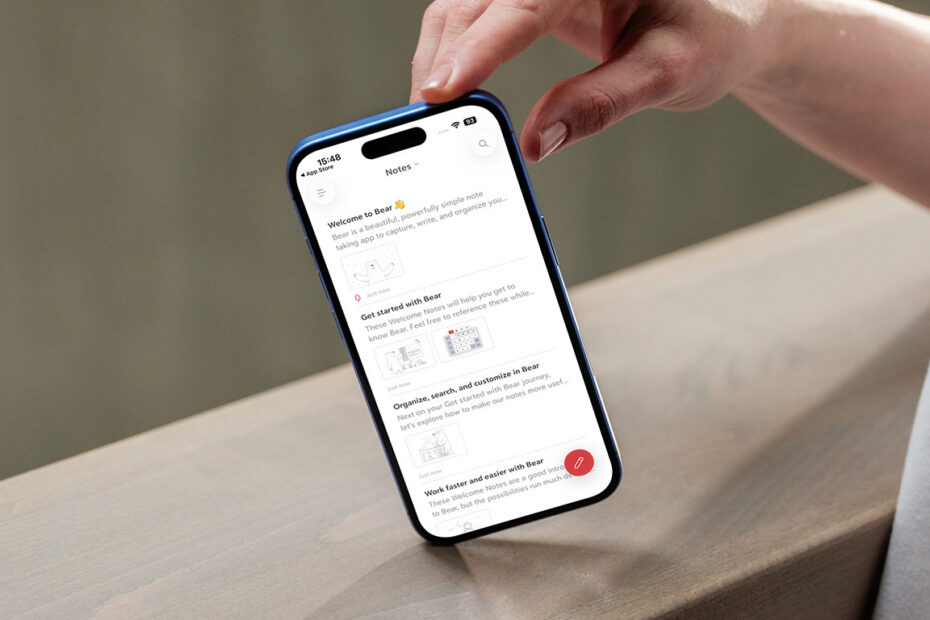

The latest entry in our classic iPhone and iPad app series set a new standard in its field that left everyone else taking notes.

Bear for iPad, in 2016.
What was Bear?
A beautiful, simple, and powerful note-taking app for iPhone, iPad, and Mac, designed to help you capture, write, and organize your thoughts.
Why was it a classic?
It looked fantastic and felt effortless to use. Beneath the elegant interface was a feature set that steadily expanded over time, without sacrificing immediacy. Bear respected beginners while quietly rewarding power users.
Where is it now?
Still on the App Store, being actively developed and regularly updated, with its signature mix of usability and depth.
Get Bear (free + IAP) from the App Store or visit the Bear website.

Bear in 2026.
Q&A: a brief history of Bear
Shiny Frog co-founder and Bear co-creator Danilo Bonardi details how his team reimagined note-taking for the modern era.
What was the original spark for Bear?
Danilo: The main problem we wanted to solve was making something really reliable and fast for taking notes. The idea was to merge the ethos of Notational Velocity – a Mac app focused on creating new notes as quickly as possible – with the flexibility of Markdown.

A very early Bear work-in-progress mockup on Mac.
Why Markdown? And how did you make a markup language approachable?
Our idea was for people to use Markdown without even realizing they were doing so, as if they were using any other notes app or text editor. We chose Markdown because we’re passionate about open formats. With Markdown, you’re creating plain text files that are future-proof. And it’s versatile and flexible enough to be transformed into HTML, DOCX, or any other format you want.
How did you make Bear stand out from the competition?
At the time, very few Markdown editors supported attachments, so we focused on making Bear easy to use with images. Shortly after launch, we added sketch editor support on iPhone and iPad, so you could add drawings and annotations. We’d also worked a lot with tags in our previous app, and decided to use them for organizing notes in Bear – even though we knew that would make some people mad, because they want folders!
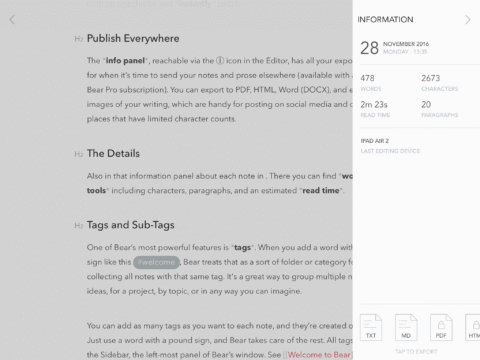
Inline tags meant Bear users were never taken out of their flow while organizing notes.
So why use tags over folders?
We needed feature parity across platforms, but quickly realized that creating folders on mobile could be tricky and inconvenient, especially when jotting down notes on the fly. Tags can be added while writing and editing a note, without breaking your flow. They also let a single note appear in multiple groups in the sidebar at once, rather than being confined to a single folder.
As Bear evolved, how did you decide which new features to add?
There’s a “range” of notes apps that spans from Apple Notes at one end to Obsidian and its many plug-ins at the other. Bear lives somewhere in the middle. It’s approachable yet also powerful. Everything we introduced in Bear 2.0 followed that line of thinking. We stayed true to the mission concept of Bear 1.0 – the minimalism – while adding more advanced features like backlinks, folding, and editor tools for scholars and researchers.
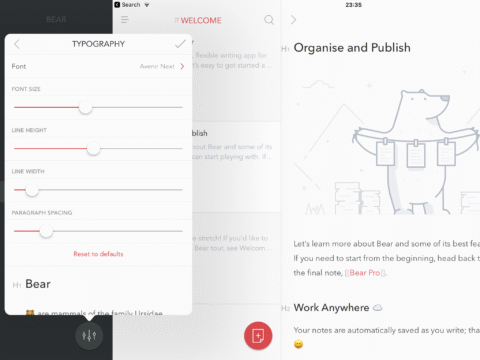
From the very beginning, Bear championed quality typography.
You mention minimalism, but Bear never feels sterile. What drives your approach to visual design?
We are very passionate about typography. With Bear 2.0, we created a custom typeface and spent a lot of time working on vertical rhythm – spacing around headings, lists, and other elements – as well as every component of the interface. Good typography makes content easier to read and scan, so you can more rapidly find what you’re looking for.
So our approach isn’t just about aesthetics. We always try to bring functional benefits in parallel. A minimal interface keeps everything approachable. If there are loads of icons in your face, you’ll be overwhelmed. Clarity is the guiding principle, giving users what they need, when they need it.
Bear was always cross-platform. Do you consciously design for each device?
We designed Bear around a three-column system that scales across iPhone, iPad, and Mac, with columns that can be hidden depending on screen size. But we also think it’s wrong to not consider the device someone’s using. So on iOS, we placed the “new note” button at the bottom right – controversial at the time, because it was inspired by Android. We felt that was right, though, because it’s the best position for your thumb, but that decision didn’t need to carry over to Mac.

Bear circa 2018, with its controversial “new note” button.
Why do you think Bear has endured?
Bear is almost ten years old, and we’re focused entirely on the app and making great software. My take is we’re still here because the concept works and we avoid industry hype cycles and shipping features for the sake of it. Bear remains true to its original goals and we try to remain true to ourselves.
What recent Bear additions are you proud of – and what’s next?
One thing that’s not mainstream, but that’s really important, is the new level of encryption we introduced to better protect user data. We now support Apple’s Advanced Data Protection for iCloud. So these changes bring a much more sophisticated layer of security for notes and attachments.
I’m also very glad we added MathJax/LaTeX support for the scientific community, which was a frequent request. We’re a small team, so we have to be selective with new features – but this one really matters to us. Several of us come from science, math, and engineering backgrounds, and so we feel a connection.
As for what’s next, Bear Web is in beta and will launch later this year. It’s built on top of iCloud, so it works without compromising user privacy. Alongside that, there are loads of smaller updates, such as over 250 new icons designed to better match the latest iOS and macOS styles. We’re very proud of those. And we’re also working on a Bear spin-off – its code name is Panda – for those people who prefer folders over tags.