

There was a time when the iPhone didn’t bother with a traditional file manager. Apple insisted you didn’t need one, and documents effectively lived ‘inside’ apps. That was fine for the odd Pages file, but things got messy as the iPhone grew more capable and you wanted to hop between apps and devices.
Apple addressed this with the Files app in 2017. It’s seen plenty of improvements since and is now a capable file manager reminiscent of a stripped-down macOS Finder. But sometimes it’s not enough. So this roundup looks at what Files does well and three alternatives to consider when you need more.
Files (free)
- Best for: iCloud Drive

Files comes preinstalled on your iPhone and keeps things simple. Its three tabs take you to recent files, shared documents, and Browse, where you find favorites, tags, and any extra locations you’ve added.
The app can connect to local network drives, such as shared volumes on a Mac or PC. Those live in the Browse tab’s root but frustratingly don’t persist, meaning you must reconnect each time. Fortunately, Files lets you set other file managers as Locations (… > Edit to manage those), effectively turning it into a central hub.
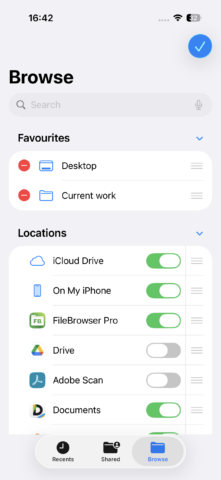
Beyond that, Files handles basic previews (although hands them off to other apps when it can) and simple tasks like creating ZIP archives. If your file management demands are slight and you mostly live in iCloud Drive, Files is all you need.
Owlfiles (free or $13/£13 per year or $30/£30 lifetime)
- Best for: friendly extras

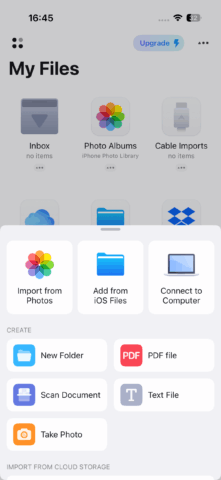
Owlfiles is a fast, friendly upgrade over Apple’s offering. The My Files tab focuses on local storage, your photo library, and iCloud Drive. Connections goes further, letting you create persistent links to local network storage, computers, FTP servers, and a wide range of cloud services.
Document previews are excellent. Image thumbnails look great in grid view. Tap an image to preview it and you can swipe between other images within the folder (rather than all documents) and kick off a slideshow. Plain text documents can be previewed and directly edited. And the audio player looks sharp and supports various formats, including FLAC.

The free tier is generous but limited. You can’t sync folders between sources, edit images (not a huge loss, since Photos is better for that) and – most significantly – store more than three connections. If that last constraint is the only hitch, consider predecessor app FE File Explorer Pro ($5/£5), which offers unlimited connections and combines the My Files and Connections tabs into a single pane.
FileBrowser Professional ($15/15)
- Best for: power users

FileBrowser Professional is in similar territory to Owlfiles, offering fast access to local storage, extensive remote connection options, and robust previews. It’s not ideal for music – our test files were displayed in a random order – but basic image-editing tools make it quick to rotate or flip photos.
Where the app really shines is when you browse. The interface is more cluttered and less approachable than Owlfiles, but in return you get more flexibility. Multiple tabs let you browse several locations at once, giving the app a desktop-like feel. You can view hidden files, sync folders, bookmark locations without cluttering your favorites, and use a folder history to jump back to recently visited places.
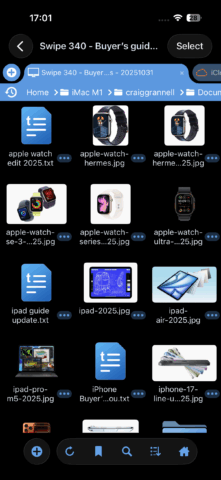
Even if Files is your main file manager, FileBrowser Professional is an excellent secondary tool for more involved tasks. Also, if you like the idea of tabs but don’t need image editing or the full range of connections, try the cheaper FileBrowser ($8/£8) or test the waters with FileBrowserGO (from free).
Documents (free or $10/£10 per month)
- Best for: media browsing
Before Files existed, Documents was many people’s go-to file manager on iPhone. Today, it can connect to iCloud Drive and external storage, although – like Files – it won’t retain shortcuts after you disconnect. It also feels more self-contained than the other apps here, encouraging you to work within Documents itself – a holdover from its pre-Files era.
But that approach has perks. The app includes its own browser and VPN, and a suite of media-oriented tools, though the editing tools sit behind a hefty $10/£10 monthly subscription. Media viewing is free, though, and often first-rate. Image browsing is polished, the music player works well (even if, alas, FLAC is not supported), text files can be edited, and video playback even includes quirky air-gesture controls. (These feel a bit like that bit in the Hitchhiker’s Guide that describes you having to “wave your hand in the general direction of the components and hope” when dealing with a device. Still: fun!)

In all, Documents is less essential than it once was, and the subscription tier is hard to justify. But as an all-in-one self-contained workspace for specific projects or polished media playback, it earns its place.