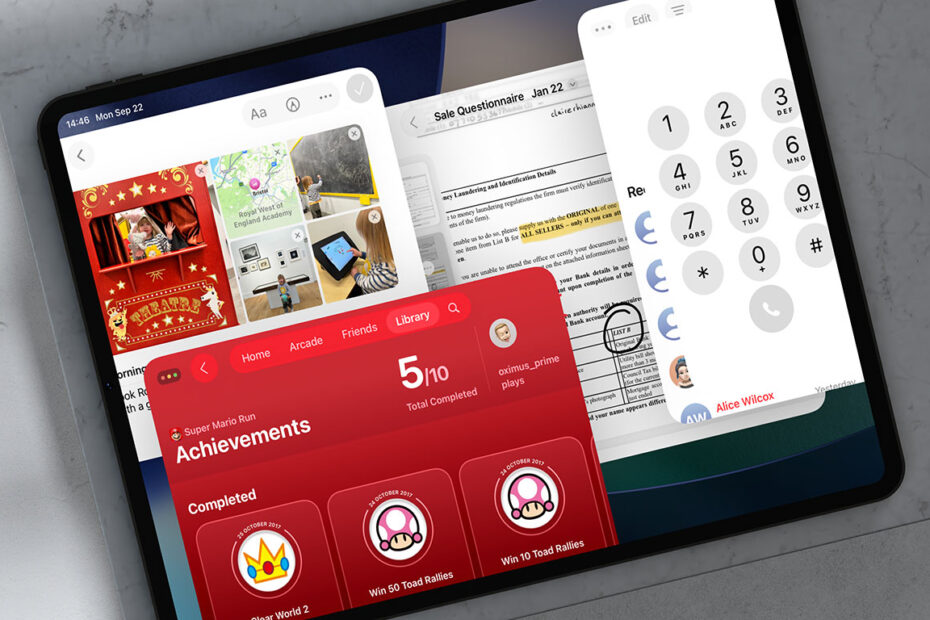

iPadOS 26 brings four notable apps to the iPad for the first time: two borrowed from iPhone, one from the Mac, and one that’s completely new this year. Each fills a gap that previously made the iPad feel less independent, and together they make the device more useful than ever.
Let’s take a very quick look at each of the new apps, each of which should be automatically available on your Home Screen after updating to iPadOS 26.
Preview
Preview will be instantly familiar to Mac users. It’s Apple’s built-in tool for opening and editing PDFs and images, and on iPad it works beautifully with Apple Pencil. You can annotate a contract, fill out a form, or quickly resize an image without needing third-party software. Because it integrates directly with the Files app, anything you mark up is saved straight back to your storage, and it’s easy to find existing documents with its built-in file browser.

Phone
Phone might sound odd on an iPad, but it makes sense. If you use your iPad as your main device at home, you can now place and receive calls directly without reaching for your iPhone. Previously, you could receive calls via iPhone relay but not make outgoing calls or see a call history. It also supports Live Translation, so you can have calls translated in real time. You still need a cellular connection or an iPhone nearby to act as a relay, but the experience is much closer to using the Phone app on iPhone.

Journal
Journal also makes the leap from iPhone. The bigger screen makes it a much better fit, especially with Pencil support for handwritten notes or sketches. You can add photos, audio, or location details to each entry, and even view your journal entries on a map to see where you’ve been writing. It’s private by design, locked behind Face ID or Touch ID, and syncing securely through iCloud.

Games
Finally, Games is a brand-new addition. It acts as a hub for all the games you have installed, showing them in one place with quick links to the App Store for recommendations and updates. It includes controller support so you can jump straight into a game without fiddling through Home Screen folders. This one’s a new addition to iPhone and Mac too this year, replacing and building on Game Centre, which used to be hidden within settings and fairly limited.
