iOS 27 looks to be a quiet year for new features, but that doesn’t mean there’s nothing new – Apple is finally making good on its promise of a more powerful Siri, with a ton of new AI-powered capabilities across the board.
As ever, all this Apple Intelligence stuff is privacy-first: everything runs on your device or on Apple’s Private Cloud Compute, which Apple says keeps your data private and lets outside experts check its work.

Here’s everything new with Apple Intelligence and the newly-renamed Siri AI.
An assistant you can actually talk to
Apple has rebuilt Siri from the ground up into something far more conversational, able to answer open-ended questions and hold a proper back-and-forth rather than fumbling and offering you a web search. It’s the assistant Apple promised two years ago, firmly inspired by the success of rival chatbots. Behind the scenes, it’s even powered by some of the same tech that Google Gemini runs on.
Siri AI even gets its own app for longer conversations, where you can revisit past chats, pin the important ones, and start fresh. Your history syncs privately across your devices via iCloud, so a conversation you begin on your iPhone is waiting on your iPad and Mac.

Siri is better with context
Siri AI can draw on your own stuff – messages, emails, photos, notes – to find things and answer questions. Ask it to dig out the address someone texted you weeks ago, or the photos from last summer, and it should pull them together without you spelling everything out.
Onscreen awareness means Siri AI also understands whatever you’re looking at, so you can ask about it directly. Handy for acting on something in an email or message without copying and pasting back and forth. Siri AI can do things across apps using plain language – editing a message you just sent, adding a song to a playlist, setting a reminder.
And rather than punting all your more complex questions off to ChatGPT, Siri AI now draws on broad world knowledge and goes out to the web itself for up-to-date answers.
Siri mode in the Camera
Point your camera at something and Siri AI can tell you about it, answer questions, or act on what it sees – splitting a bill with Apple Cash, say, or pulling up the nutritional info for a plate of food. You’ll also get the same kind of smarts when taking screenshots, building on the Visual Intelligence features that already exist. This all now stretches beyond the iPhone to iPad, Mac, and Vision Pro, so you can ask about what’s on screen or in front of you across your devices.

Improved speaking and listening
Siri gets new, more natural-sounding voices, and you can adjust their pace and expressiveness until they’re just right. And those changes work across a bunch of different accents.
Dictation gets a serious upgrade too, with better speech recognition and automatic punctuation, capitalization, and formatting – so you can talk naturally and let it handle the tidying up.
Writing assistance anywhere
Apple’s systemwide Writing Tools are now woven into Siri, so you can write or rework text just about anywhere you type. Just describe what you need and Siri drafts it from scratch or makes the requested changes. It tries to match how you usually write, down to the tone and punctuation you’d use for a particular person. Siri also proofreads automatically as you type across the system, like a souped-up spellcheck, including in most third-party apps.
Photorealistic Image Playground
Image Playground has been rebuilt and can now generate photorealistic images, not just the cartoonish styles it was stuck with before, running on Apple’s Private Cloud Compute. You can tweak the results by describing a change, or by tapping, circling, or brushing an object to move or resize it – then turn them into Lock Screen wallpapers, Contact Posters, or whatever aspect ratio you need. Every AI-generated image carries a hidden SynthID watermark to flag it as artificial, as do photos you edit with Apple Intelligence. Whether that will be enough to curb the spread of fake news remains to be seen.
Generative fixes in Photos
Those photorealistic capabilities aren’t just for making silly images from scratch. Photos’ existing Clean Up tool gets a big quality bump, removing distractions with far more realistic infill and coping much better with busy, complicated scenes than it used to. There’s also a new Extend tool that does the opposite of cropping – filling in beyond a photo’s edges to give a subject more breathing room, straighten a wonky horizon, or change the aspect ratio without losing anything important.
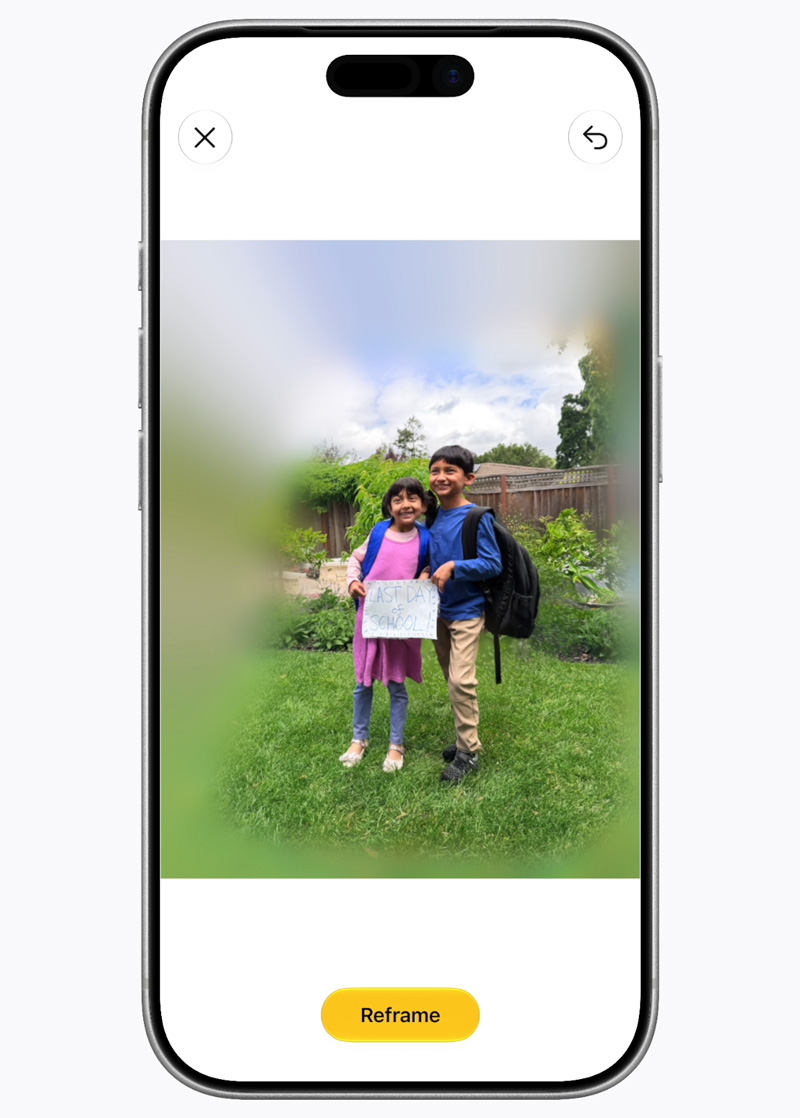
But perhaps the most impressive – and borderline creepy – addition is Spatial Reframing, which lets you change the perspective of a photo after it’s taken. Touch and drag, and the angle shifts as if you’d moved the camera, filling in only the parts that need it. You’ll get a rough preview while editing which is filled in with high-res output after you hit confirm.
Safari sorts your tabs
If you’re the type with forty tabs open, Safari can now group them into topics automatically – bundling all your holiday-planning tabs together, say, and filing new ones as you go.
It can also watch a page for you with Notify Me, pinging you when something changes. For all those cases where you’d normally sit and manually refresh the page – waiting for ticket sales or live sports updates, for example – you can now safely close the tab and hand off that responsibility to the browser.
Describe shortcuts and extensions
Shortcuts has always been powerful but a little intimidating. Describe a Shortcut changes that: explain what you want in plain language and the app assembles the steps, adjusting as you refine it. This could finally make Shortcuts something everyone uses, rather than the preserve of automation nerds.
Similarly, Safari’s describe an extension does exactly that. Dream up a browser workflow to make life easier – a button to save and rate recipes, say – and it builds a custom extension for you, right in the toolbar.
Passwords that fix themselves
The Passwords app already flags weak and compromised logins. Now it can fix them for you. With a tap, it uses Apple Intelligence and Safari to navigate to the site, sign in, and swap in a strong password on your behalf. This won’t work for all websites, and we’ll be interested to put it through its paces – but it could help users shore up their online security with almost zero effort.

One-tap suggestions in Messages
Messages can read the context of a conversation and offer one-tap actions – creating a reminder, making a note, or finding the right photos when someone asks for them. Mail’s suggestions can take action with third-party apps too.
Smart Reply in Messages and Mail can now write in your own style rather than a generic one, offering suggestions to carry on the conversation with very little user input. Apple’s examples border on the absurd, handing off basic social interactions to automation, but it could be useful in certain circumstances when you’re overwhelmed by a boring but necessary group chat.

Natural-language events in Calendar
You can add or change a Calendar event just by describing it. As you type, Calendar picks out the contacts, locations, and details, and writes the event title for you. This feels like a strange one for Apple to show off about, as I’ve been adding events with natural language for many years already. But it sounds as though this update will build on that capability so it can understand even more phrasings in more detail.
Call Context in the Phone app
Call a business and the Phone app automatically surfaces the info you’re likely to need – a flight confirmation code from Mail when you ring the airline, for instance. If you’re worried about the privacy implications, note that it works off who you’re calling, not what you say, and runs entirely on your device.

Camera smarts in the Home app
For HomeKit Secure Video cameras, Home can bundle related alerts into a single updating notification, write descriptions of what happened in your clips, let you search footage by description, and float the noteworthy moments to the top. It means you can search “package delivery” to find the clip you’re looking for rather than scrubbing through the footage.
Accessibility gets a lot smarter
This release also brings a batch of accessibility upgrades. VoiceOver offers richer image descriptions, and Live Recognition lets you press the Action button to ask about your surroundings. Magnifier adds a high-contrast assistive view, Voice Control lets you describe onscreen buttons instead of memorizing labels, and Accessibility Reader now handles trickier material and offers summaries and translation. All very welcome stuff that should keep Apple at the forefront of the accessibility world.
What you’ll need
Apple Intelligence and Siri AI need fairly recent hardware: an iPhone 15 Pro or Pro Max, or any iPhone 16 or 17.
A handful of these features, including the new Siri voices and improved dictation experience, lean on Apple’s most powerful on-device model, which only the latest iPhones will be able to run. Specifically that’s the iPhone Air, iPhone 17 Pro, and 17 Pro Max (along with the newest iPads and Macs, and Vision Pro). That’s a shame for anyone with an iPhone 17 or 16 Pro who can no longer access the latest features. We’ll pin down the full list of features that need this model ASAP.
Meanwhile some of these features will launch in English first, with more languages to follow. Apple is also working through some regulatory complications which means Siri AI will be absent in China, and unavailable on iPhones and iPads in the EU – though Mac, Apple Watch, and Vision Pro users there still get it.
As if that weren’t enough caveats, it’s also worth noting that some server-based features like image generation are free but with daily limits. You’ll need an iCloud+ subscription to raise the ceiling.
When you can try it
Siri AI and these Apple Intelligence features are set to land with iOS 27, expected September 2026.
Developers get access to the the beta program immediately, with the general public expected to get an invite to join the beta in July for those who want early access. Fair warning that these early beta tend to be buggy battery drains while the kinks are ironed out, though.