


Apple’s annual WWDC keynote has just wrapped, and after last year’s divisive design overhaul, 2026 is shaping up to be a “tock” year – less flashy new features, more sanding down rough edges. In Apple’s own words: “We take a bold leap forward… and then we iterate.”
That doesn’t mean it was a quiet keynote, though. The headline act is an all-new Siri, rebuilt from the ground up around AI, alongside a more adaptable take on Liquid Glass, and some new Screen Time tools. If you’re not fussed about the AI stuff – or your device can’t run it – there’s admittedly not a lot here that’s new. But it’s nice to finally see Siri get the overhaul we were promised.
Here’s everything worth knowing.
An improved Liquid Glass
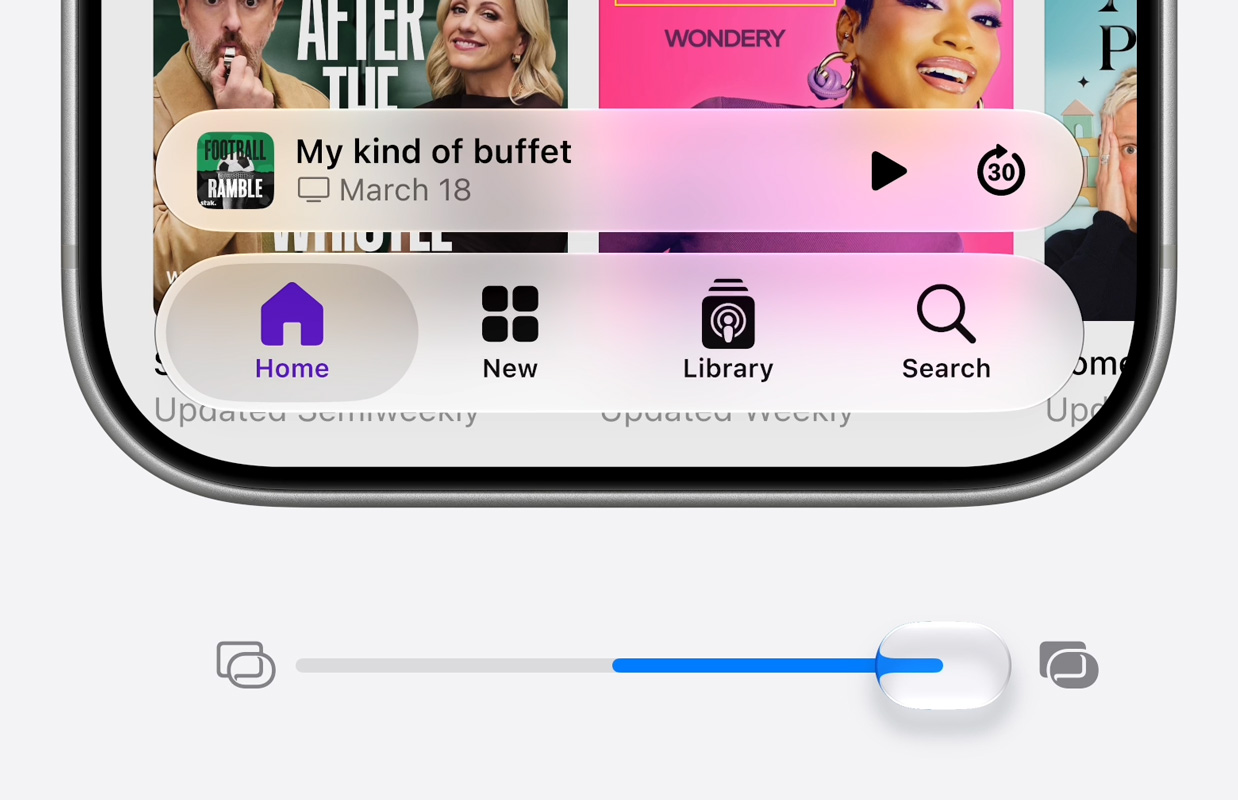
Last year’s Liquid Glass redesign split opinion, and Apple’s clearly been listening. iOS 27 adds a slider to dial the effect anywhere from fully clear to fully tinted, rather than forcing you to pick one of two fixed modes – so in theory there’s a setting to suit everyone.
Elsewhere, the refinements are sensible. Toolbars are making a comeback in some apps to make those floating buttons feel less unmoored, while unnecessary sidebar bezels and overly round corners have been reined in. Even app icons have been rethought: instead of slathering the glassy effect over everything, only some elements catch the light now, for a crisper look.
Faster, smarter, and still on iPhone 11
A lot of this year’s work happened under the hood. Apple says it’s focused on making everything feel more responsive – snappier animations, faster app launches, and better efficiency across the board. Photos is the standout for me: that annoying “pop-in” lag when you open it straight after taking a shot should be around 70% faster now.
Your iPhone is also said to be smarter about juggling Wi-Fi and cellular, handling weak signal more gracefully. Search gets a boost too, with Spotlight, Photos, and Mail benefiting from better indexing – though since that happens in the background after you update, you might not notice straight away. Maps, meanwhile, gets a far more detailed and realistic Flyover view.
The good news for older hardware: iOS 27 runs on iPhone 11 and later – exactly the same lineup as iOS 26. It’s impressive that Apple is supporting these devices for so long with software updates, although admittedly they don’t all run Apple Intelligence.
Looking out for the kids
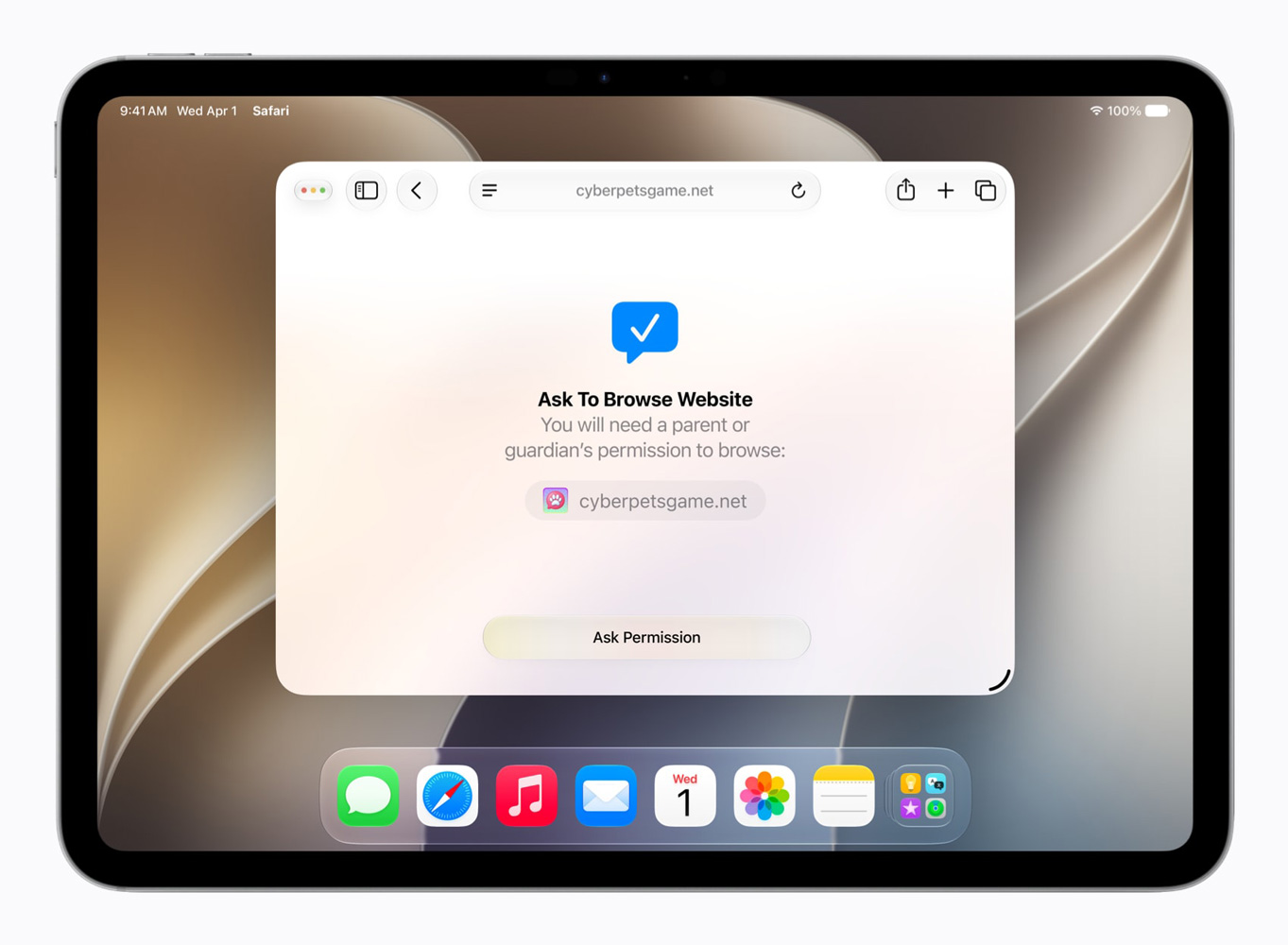
Trust and safety got a decent chunk of stage time, with Apple’s child account – required for under-13s and available up to 18 – getting some more advanced safeguards. The Ask to Buy system, which lets parents approve App Store downloads, now extends to Ask to Browse, so kids need permission before opening a new website in Safari. They’ll also need a parent’s nod before connecting with a new contact in Messages, FaceTime, or Phone.
Communication Safety, which already blurs nudity in Messages and FaceTime and is on by default for child accounts, will now also step in to block gore and violent content. There’s also Time Allowances, a new Screen Time feature with sensible default limits per app category based on a child’s age, plus customizable schedules for school days, weekends, and the like. Screen Time itself has had a bit of a visual overhaul too.
The Siri that was promised
Here’s the big one. Apple has, in its words, “rebuilt Siri with powerful AI at the core” – and named it, wait for it… Siri AI.
This looks like the Siri we were promised two years ago, finally turning up. It’s far more conversational, giving detailed back-and-forth answers like a proper chatbot, and it can now understand what’s on your screen thanks to Spotlight’s semantic smarts. It’ll also search the web itself rather than punting straight to ChatGPT. And while Apple leans on its own Foundation Models, it’s quietly confirmed they’re built in partnership with Google’s Gemini – a notable admission for a company that likes to keep things in-house.
There’s a dedicated Siri app for longer chats, with your history synced privately across devices via iCloud, though quick one-off requests still work as before. The look is more muted than the old colorful orb, possibly signaling that Apple thinks Siri has finally grown up. You also get new voices, with adjustable pace, expression, and accent.
Siri AI was shown handling complex, multi-step requests that dip into apps and remember context – pulling up a World Cup schedule, then planning a watch party with recipe ideas and a group invite, all in one flowing conversation. It’ll be interesting to see if real-world scenarios work as seamlessly as these planned tech demos – and we’re not sure such basic examples like the one below are particularly helpful in selling the concept.

Writing tools are baked in too, so you can ask Siri to draft or edit text in apps like Notes, with systemwide proofreading along for the ride. It’ll launch in English first, with more languages to follow.
More from Apple Intelligence
Beyond Siri, AI now threads through loads of apps. Image Playground gets a full overhaul with new models that can produce high-quality images in any style – including, for the first time, photorealistic ones. So much for the cartoonish-only approach supposedly keeping fake photos at bay.
Photos gains an improved Clean Up tool, plus a Photoshop-style Extend feature for adding space beyond a photo’s edges, and a slightly creepy Spatial Reframing tool for tweaking perspective after the fact.
Safari can now bundle your tabs into topics, watch a page for you with Notify Me, and even build custom extensions from a prompt. The Passwords app can update compromised passwords on your behalf, and Shortcuts will now build an automation from a plain description, which might finally make the automation app appeal to non-nerds.
There’s more – contextual suggestions in Messages and Mail, smarter natural-language event creation in Calendar, useful info surfacing when you call a business, and AI summaries of your security camera footage in Home. There’s probably lots more small changes coming that we’ll report on in due course, but these are the main ones called out during the keynote.
Availability and goodbyes
The new software lands this fall, with developer betas available now and public betas due in July. iOS 27 supports iPhone 11 and later, while the Apple Intelligence features need the same hardware as before – with the most demanding on-device tricks reserved for Apple’s newest phones, including the iPhone 17 Pro.
It’s worth noting that some server-based AI features like image generation come with daily limits, with an iCloud+ subscription unlocking higher usage limits. Plus, thanks to the EU’s Digital Markets Act, Siri AI won’t launch on iPhone or iPad in the EU – though Mac, Apple Watch, and Vision Pro users there still get it. It’s off the table in China for now too, but UK readers, you’re fine.
The event closed on a personal note, with a short thank-you speech from CEO Tim Cook – his last big keynote before handing the reins to John Ternus on September 1. That was followed by, of all things, a faintly bizarre rap video celebrating third-party apps. You can rewatch the whole thing in full on Apple’s website if you dare.
We’ll have much more on everything in the days and weeks ahead as we dig into the developer beta. Stay tuned!