
- Where Create an Extension hides
- Prompts that actually work
- Bonus: alerts when a page changes
Safari extensions are great, letting users tweak their web browsing experience to their liking. But they’ve typically been something built by uber geeks, and occasionally installed by regular users.
iOS 27 hands that power to everyday non-techy folks. Safari can now build an extension for you from a plain description of what you want it to do – no code, no developer account, no App Store. You get to tweak your own browsing experience instead of waiting for somebody else to do it for you.
You’ll need an iPhone that supports Apple Intelligence, which means an iPhone 15 Pro or later. If Create an Extension isn’t in the menu, that’s why.
Finding Create an Extension
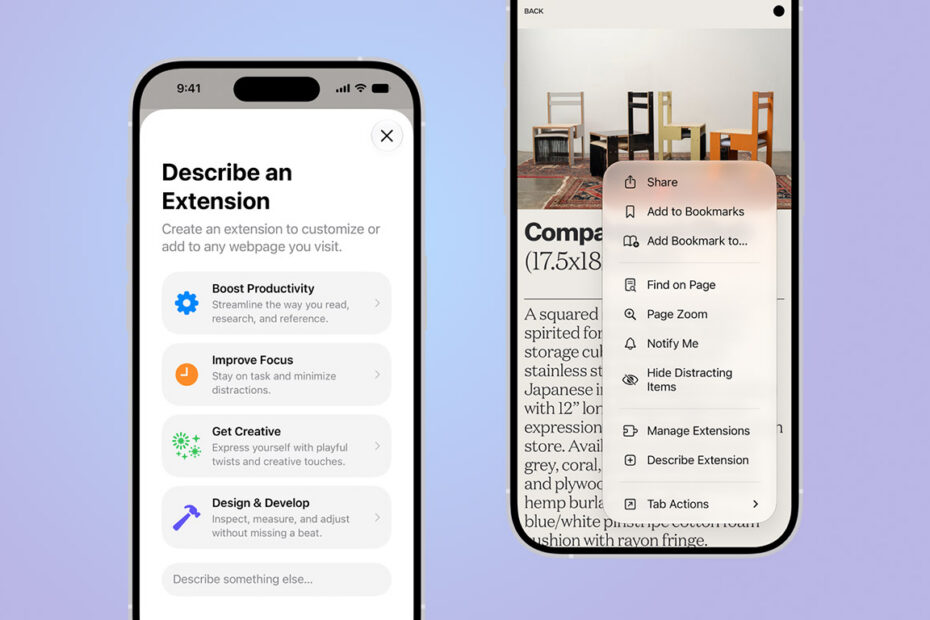
Tap the settings icon to the left of the address bar in Safari, then choose Create an Extension.
You’ll get a text box asking what you want your extension to do. Type it in plain English. Apple also offers starting suggestions grouped into Boost Productivity, Improve Focus, Get Creative, and Develop and Design – worth a look if you’re not sure what’s possible.
Prompts that work well
If you haven’t thought much about extensions before, you might be wondering what the point of setting one up could possibly be – so here are a few examples from Apple to get your imagination up and running. The trick to a good prompt is being specific about the behavior rather than the outcome.
- Create a citation for this page and copy it to my clipboard
- Set the minimum font size to 14pt
- Give me a three-minute focus timer for this page
- Highlight the dimensions of page elements when I tap them
- Turn on design mode so I can edit the page contents
- Rewrite the page in pirate speak
- Restyle every website like its 1998
Once it’s built, the extension behaves like any other – you manage it from your Safari settings and turn it off when you’re done with it.
Bonus: get told when a webpage changes
The same menu hides Notify Me, another new addition in iOS 27. This feature watches a page and pings you when something changes. Good for tickets going on sale, stock coming back in, or a fixture that hasn’t been confirmed yet.
Open the page, tap the settings icon, choose Notify Me, and describe what you want Safari to look out for. Hourly is the fastest check, with daily, weekly and monthly options too.