
With so many big changes in iOS 26, it’s easy to overlook some of the smaller quality-of-life improvements. One such feature is callback reminders – a subtle but thoughtful addition to the Phone app designed to help you remember to return missed calls.
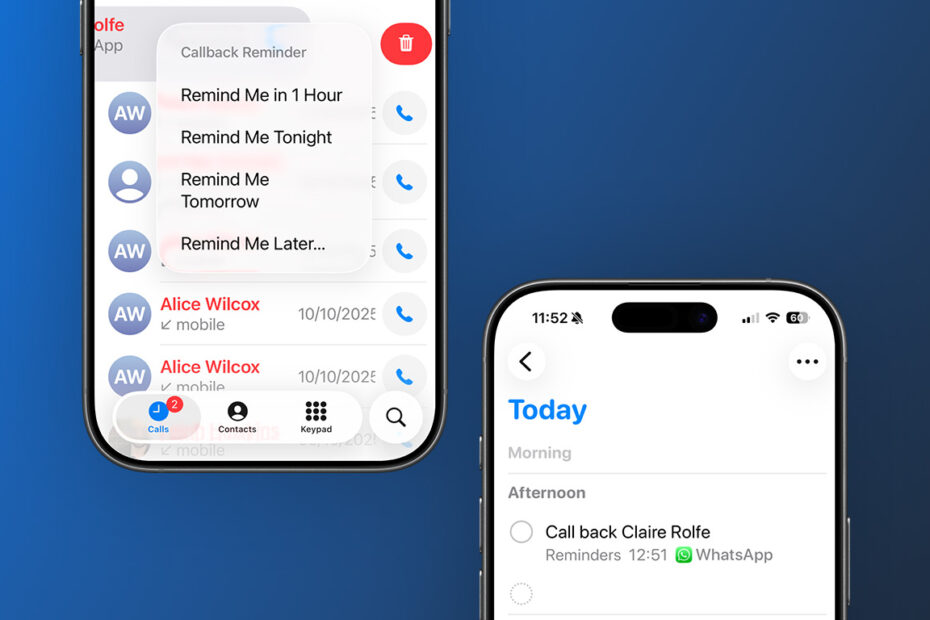
When you miss a call, open the Phone app and switch to the Recents tab. Swipe across the entry for the missed call and you’ll see a new blue clock icon alongside the usual call and message buttons.

Tap it to set a reminder to call back later, with options like Remind Me in 1 Hour, Tonight, Tomorrow, or Later. Choosing Later brings up a more detailed picker where you can choose an exact time.
Once set, the reminder appears automatically in the Reminders app. You’ll get a notification at the chosen time, and you can manage or dismiss it just like any other reminder. There’s even a quick shortcut to return the call directly from the reminder by tapping the phone icon next to the contact’s name.
It’s not as headline-grabbing as features like Call Screening and Hold Assist, but it’s one of those small changes that quietly makes iPhone life easier – especially if you’re prone to forgetting who you meant to call back.