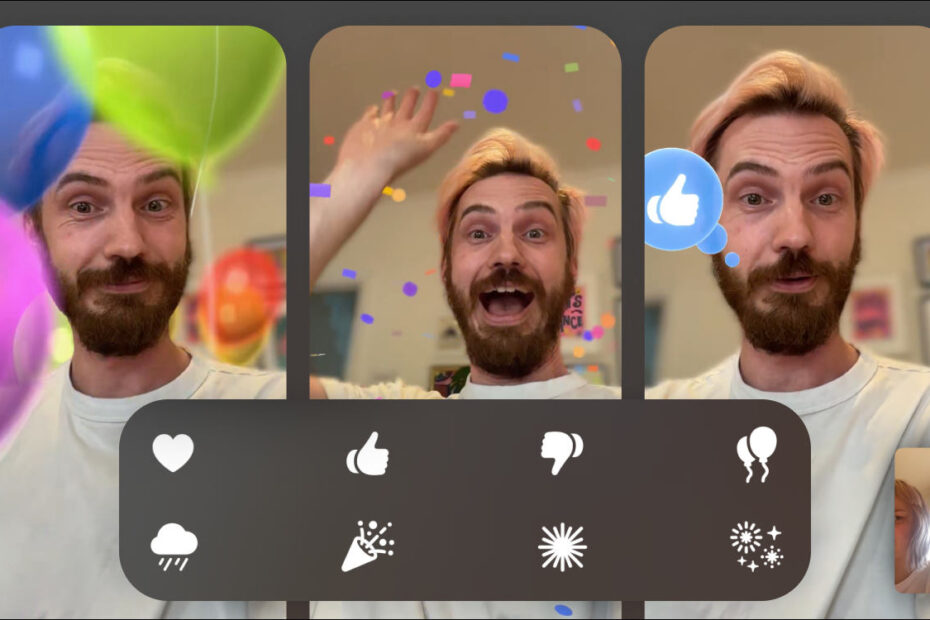
- FaceTime has full-screen augmented-reality ‘reactions’
- These 3D animations are triggered with hand gestures
- You can now leave audio and video ‘voicemails’ over FaceTime
Reactions are here
If you’re a fan of the animated effects in Messages, you’ll love Reactions in FaceTime. All-new ‘reactions’ can fill the frame with fun effects to add a bit of personality to your visuals when on a video call.
These 3D animations appear in augmented reality, meaning they move around and behind the people in the frame, making it look like the room really is filled with balloons or fireworks. The downside is that people with older devices miss out – these AR effects need an iPad with an A14 chip or later, such as iPad Air (4th generation), iPad mini (6th generation), iPad (10th generation) or an M-series iPad Pro.

Use your hands
These reaction effects can be triggered with simple hand gestures. Some of these are straightforward: give a thumbs up to display a thumbs up emoji, or make a heart shape with both hands to summon a deluge of floating hearts. Others are less obvious, so here’s a list of gestures you can try:
- Thumbs up: thumbs up
- Thumbs down: thumbs down
- Double thumbs up: fireworks
- Double thumbs down: clouds
- Heart with two hands: hearts
- Peace sign: balloons
- Double peace sign: confetti
- Double “rock” sign: lasers
Alternatively, you can long-press your picture to bring up a menu of all available effects and simply tap them to play the animations.
Leave a message
Another smart addition is the ability to leave an audio or video message through FaceTime if you call somebody who doesn’t pick up. This is great for those fleeting moments where you want to show something off but they’re not available – just record a quick video voicemail instead!