
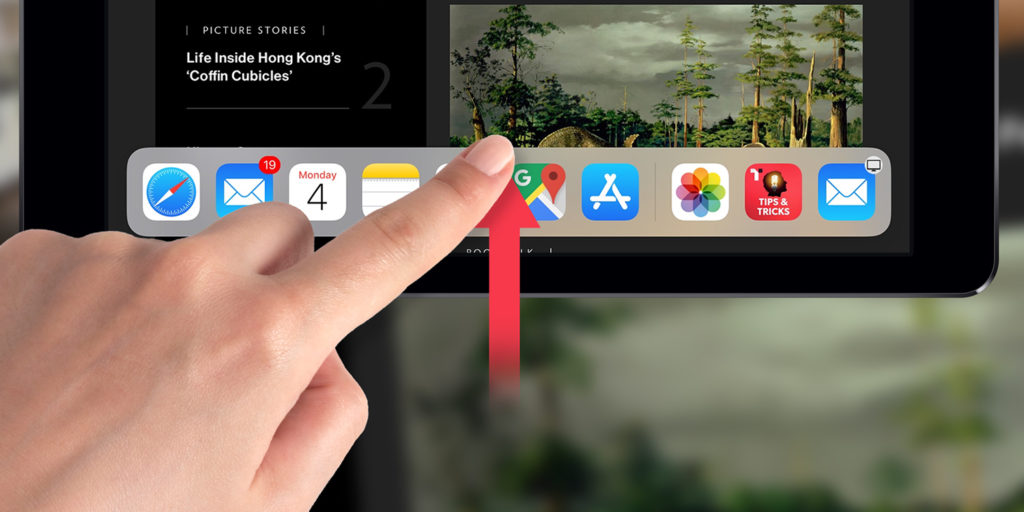


The bank of icons at the bottom of the Home screen is called the app dock. It provides quick access to your recently used and favorite apps. When rearranging apps, you can drop them onto the app dock to create easy shortcuts.
In addition to the usual apps you have selected for the dock positioned to the left, you’ll find that Apple automatically recommends three more apps to the right. These may be comprised of recently used apps, or even the ones you accessed last on your iPhone or Mac thanks to Apple’s continuity system.
Whatever you’re doing on your iPad, you can access the app dock with a gentle swipe up from the bottom of the screen. Careful you don’t swipe too quickly as it will instead take you back to the Home screen. Swiping further up and pausing will not only reveal the dock, but the App Switcher as well.
Finally, you can adjust the behavior of the dock from Settings. Navigate to Multitasking & Gestures and toggle Automatically Show and Hide Dock on or off.