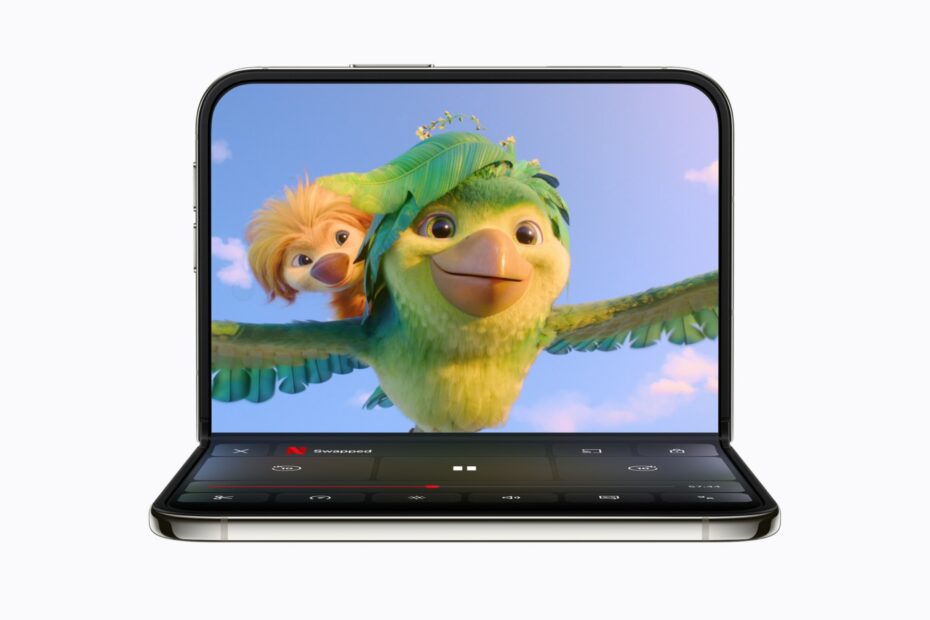

- Prop it up like a laptop to watch with the controls below
- The keyboard drops into the bottom half for typing
- Hold it like a book and buttons move away from the fold
Most phones only know two positions: portrait and landscape. iPhone Duo also knows how far its hinge is open, and the hinge holds almost any angle you leave it at. That means you can stand it on a table without a case or stand, and iOS rearranges the screen to suit the way you’ve posed it.
This feature is exclusive to iPhone Duo. Apps need updating to take full advantage, and Apple’s own apps already do.
Seated: a tiny laptop
Apple calls this the seated position. Open iPhone Duo partway and set it down with the bottom half flat on the table, like a laptop. Content moves to the top half and the controls move to the bottom half. Play something in the Apple TV app and the video sits up top while the playback controls sit below, within easy reach.
It’s ideal for watching on a plane or train, following a workout, or keeping a recipe in view in the kitchen.
Typing in the seated position
Open Notes or Messages while seated and the keyboard fills the bottom half, leaving the top half for what you’re writing. It feels like a very small laptop. It works best if you steady the phone with a couple of fingers at the top, as the light top half can wobble while you type.
A split keyboard
Hold iPhone Duo open in landscape and fold it partway, and the keyboard splits in two so you can type with your thumbs on either side of the fold. Open it flat again and the keyboard joins back up.
Book: reading around the fold
Hold iPhone Duo partly open like a book and the screen bends through the middle. iOS moves text, images and buttons away from the center so nothing important ends up in the fold, and the fold becomes a natural divider between the two sides of the app.
Better with updated apps
Some apps go further. Netflix, for example, shows a mini player with controls on the bottom half when you put it in the seated position. Apps that haven’t been updated for iPhone Duo won’t rearrange themselves, so keep your apps up to date.
Pro tip: a partly folded iPhone Duo is also a ready-made tripod. Set it down to take long Night mode photos without anything to lean it on, or use it to get yourself in the shot with Smart Take.