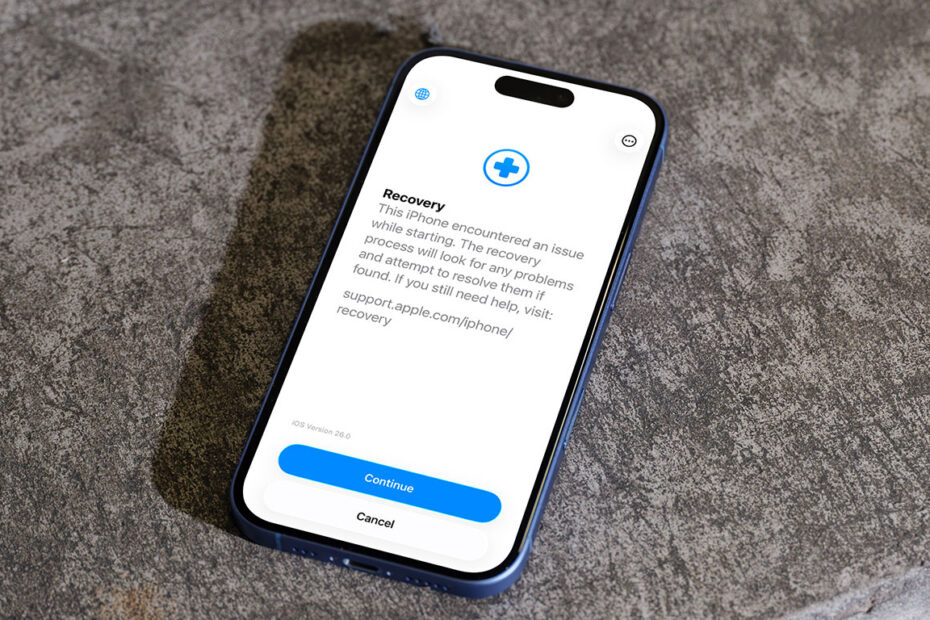

- Recovery Assistant was added in iOS 26
- It offers a lifeline when your iPhone refuses to start
- How automatic and manual recovery differ
Few things cause more panic than an iPhone that won’t turn on properly. In the past, that usually meant plugging into a computer for a manual reset process or making an appointment at the Genius Bar. With iOS 26, Apple introduced Recovery Assistant, a built-in tool designed to diagnose and fix startup problems directly on the device. If something goes wrong during startup, your iPhone can automatically enter a special recovery screen, download the software it needs, and attempt to repair itself. You can even reinstall iOS remotely with help from another Apple device, avoiding the need for a full restore.
Automatic recovery
If your iPhone detects a serious startup issue or keeps crashing during boot, it may launch Recovery Assistant automatically. All you need to do is tap Continue. Your device will connect to Wi-Fi, download a recovery package, and apply the fix. This can take a few minutes. When the process completes, restart the device and see if normal operation returns. If the issue persists, make sure you’re running the latest version of iOS. If you already are, you may need to fall back to traditional recovery mode or seek service.
Manual recovery
You can also launch Recovery Assistant yourself. Connect the device to a power source or a computer, turn it off, press and hold the side button until the connect-to-computer screen appears, then release the button. After that, double-press the side button to load Recovery Assistant. You’ll be guided through what happens next, including a prompt asking whether you’d like to share diagnostic data with Apple.
This diagnostic step is optional. Choosing to send data can help Apple understand what went wrong, but it may include sensitive information such as your name, file names, or device identifiers. Apple says this data is encrypted, used only for troubleshooting, and handled in line with its privacy policy.
A reassuring safety net
Recovery Assistant isn’t something you’ll use often, but when things go wrong it can be a huge relief. It turns a once-complicated process into a guided, on-device repair that could save you time, stress, and a trip to the store.