
- Apple’s big update makes VoiceOver even more useful
- How to switch on these rich ‘image descriptions’
- Explore photos, receipts and the world around you
Most people will never turn on VoiceOver, Apple’s screen reader that helps blind and low-vision users interact with their devices. For the people who rely on it, though, it’s the difference between an iPhone being a useful tool and a very expensive paperweight. And in iOS 27, one of its most important jobs – describing images – gets a big upgrade.
VoiceOver has been able to describe photos for years, but the results were often vague, say, “a photo of a person.” Image Explorer now uses Apple Intelligence to give far more detailed descriptions of images systemwide, from your own photos to scanned bills, personal records and pictures on the web.
Using image descriptions
To use this feature, you’ll need to first switch it on.
Go to Settings > Accessibility > VoiceOver > VoiceOver Recognition > Image Descriptions and turn on Image Descriptions. On the same screen, turn on Text Recognition as well, so VoiceOver reads out any text it finds inside an image.
VoiceOver has been around for years, but these fancy new descriptions need an iPhone that supports Apple Intelligence – iPhone 15 Pro or later.
How to explore an image
Open an image in an app like Photos or Safari and select it. Swipe up to hear more options, then double-tap when VoiceOver says Explore Image.
From there, move a finger around the image and VoiceOver describes what’s under it. That’s handy for working out where a person is standing relative to everything else in a photo, or for moving through a receipt or nutrition label in the order items are listed, rather than getting one long summary.
It works systemwide, so it isn’t limited to your own photo library. Scanned documents, images on webpages and pictures in apps that don’t provide their own accessibility labels are all fair game.
Note that if descriptions still feel short and generic, check that Apple Intelligence is turned on in Settings > Apple Intelligence & Siri. Image descriptions also aren’t available in every language yet.
Ask about what the camera sees
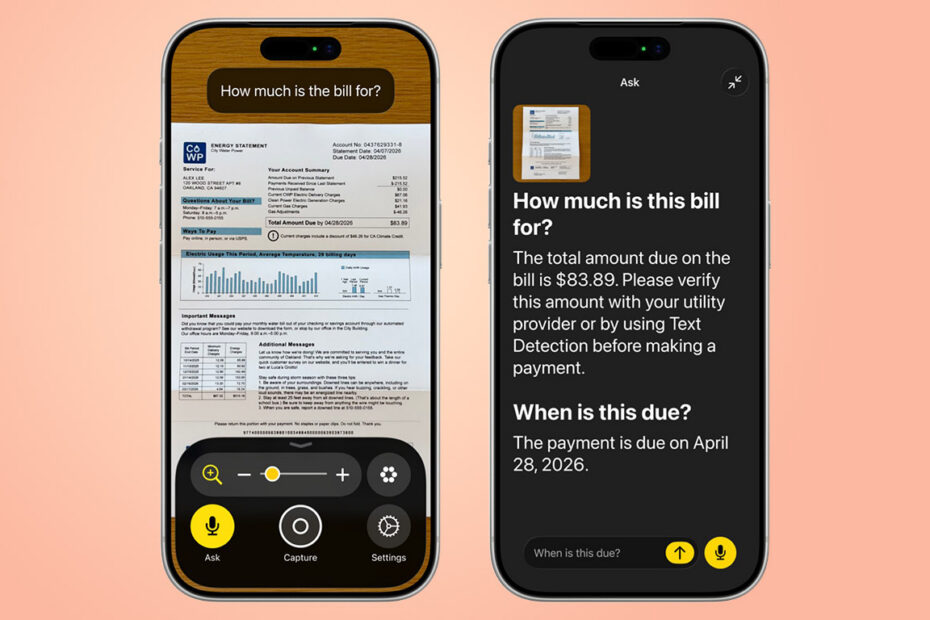
The same thinking extends to the real world. With VoiceOver on, Live Recognition describes what’s in front of the rear camera – triple-tap the screen with four fingers to start or stop it. You can now also press the Action button to ask a question about what’s in the viewfinder, get a detailed answer, then ask follow-ups in your own words.
Why it matters
For people who use this tech everyday, these image descriptions must feel like a huge step up in being able to parse the world around them. It’s good to see Apple continuing to put effort into accessibility features like this – and you might just find that some aspects of VoiceOver end up trickling down to other users over time.
As Craig Grannell points out in his look at accessibility in iOS 27, Reduce Motion started life as a fix for people made dizzy by iOS 7’s animations – then plenty of people without that problem switched it on anyway, because they preferred a calmer iPhone. In that piece, he argued this is where AI is at its best: making technology feel more human to use. VoiceOver is already proving to be a boon for dyslexic users, despite not originally being designed for them.
Everything else new in accessibility
Image Explorer is just one part of a wider update that landed with iOS 27.
Magnifier gets the same Apple Intelligence descriptions in a high-contrast interface, along with Action button questions and spoken commands like “zoom in.” Voice Control now understands natural language, so you can say “tap the purple folder” instead of memorizing exact labels. Accessibility Reader copes with complex layouts like multi-column articles and tables, and adds summaries and translation.
Elsewhere, there are automatically generated subtitles for uncaptioned videos (English in the US and Canada only, for now), Name Recognition in more than 50 languages, support for Sony’s Access controller, and a new feature that lets Apple Vision Pro users drive compatible power wheelchairs with their eyes.