Part of iPhone DuoTip 1 of 12
- Swipe an app to one side to start Split View
- Drag photos straight from one app into the other
- Pair two apps so you can jump back to them later
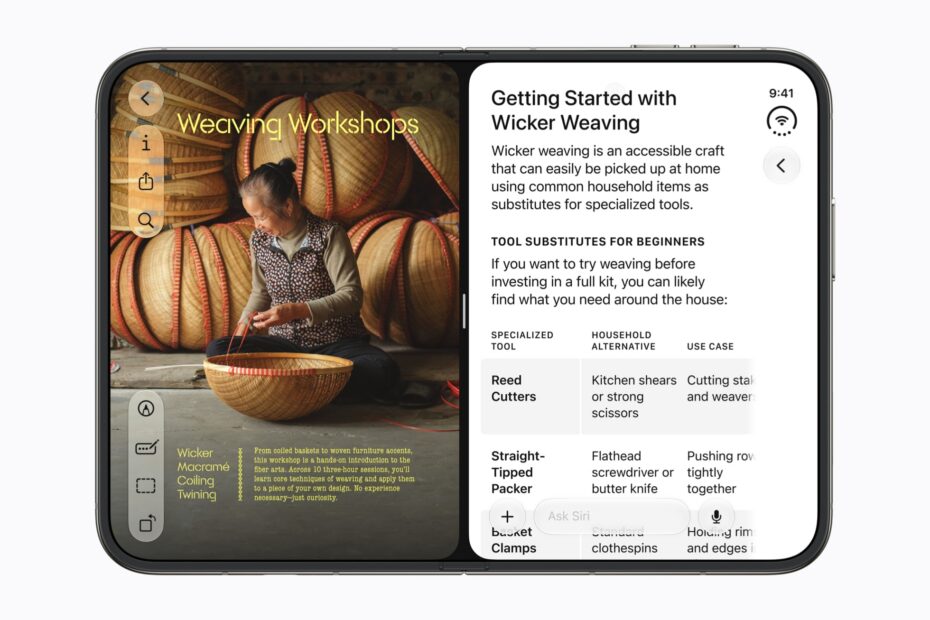
For as long as there have been iPhones, the rule has been one app at a time. iPhone Duo breaks it. Its 7.6-inch inner display can show two apps at once, each taking exactly half the screen, so you can research in Safari while you write in Notes, or keep an eye on Messages while you browse Photos.
This feature is exclusive to iPhone Duo, and works on the inner display in landscape.
How to start Split View
Unfold iPhone Duo and hold it sideways. Open the first app you want to use, then:
- Swipe up from the home indicator at the bottom of the screen, so the app shrinks into a card.
- Without pausing, slide the card to the left or right edge and let go.
- The app snaps into that half, and your Home Screen fills the other half. Tap the second app to open it.
Keep the movement smooth. If you pause on the way up, you’ll get the App Switcher instead.
Drag and drop between apps
With two apps open, touch and hold a photo until it lifts, then drag it across into the other app. It’s a quick way to drop a picture from Photos into a message or an email.
Pair your favorite apps
If you use the same two apps together often, tap the handle in the middle of the divider. The apps are now paired, and they’ll appear together in the App Switcher, so you can return to both at once. Tap the handle again to separate them.
Two windows of the same app
Split View works with two copies of the same app too, as long as it supports multiple windows. Open two Safari pages to compare prices, or two documents to copy between them.
Going back to one app
Drag the divider all the way across the app you want to close. The other app fills the screen again.
Things to know
- The split is always 50/50. You can’t drag the divider to give one app more room.
- Split View only works in landscape. Turn iPhone Duo to portrait and you’ll see just one app, but your pair returns when you turn it back.
- Apps that haven’t been updated for iPhone Duo still work, but some will look stretched or boxed in until their developers catch up.
Pro tip: in portrait, you can still watch a video while using another app. See our tip on pinning a video to the top of the screen.